> For the complete documentation index, see [llms.txt](https://guide.smarttask.io/llms.txt). Markdown versions of documentation pages are available by appending `.md` to page URLs; this page is available as [Markdown](https://guide.smarttask.io/fundamentals/time-tracking/reports-through-dashboard.md).
# Reports through Dashboard
While the Analytics View offers a set of predefined reports, the [Dashboard View](/fundamentals/reporting/dashboards.md) lets you create more customized, time-based reports tailored to your specific needs.
Example reports below:
### Timelogged by User
* This report can be further **filtered by a project**, **date range**, etc
* You can further utilize **Group by** functionality to get **project level** data for each user.
### Utilization Rate
* This chart gives you a historical representation of productivity - based on time logged by a person has to their overall capacity - Logged Time / Capacity
* You can further filter this chart by a date range.
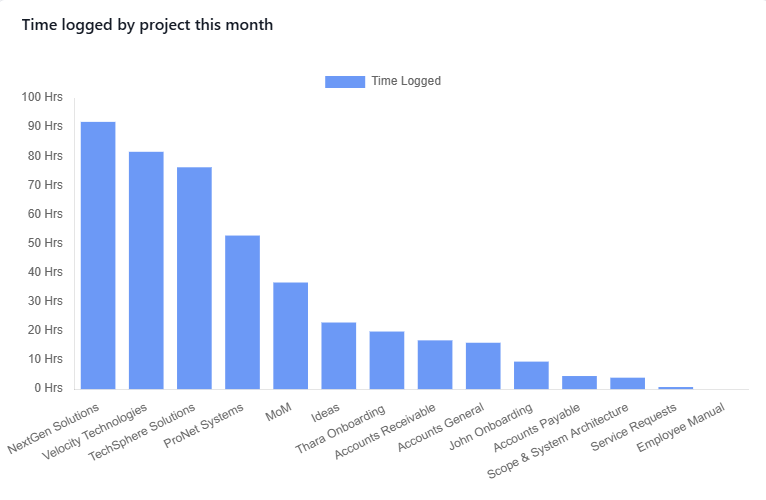
### Time logged by Projects
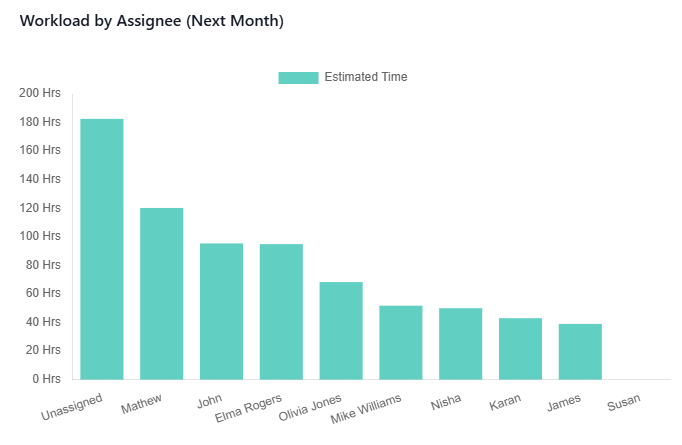
### Workload by Assignee
* You can view the upcoming workload for each assignee based a selected date-range